
Introducing Visibility Tracking

Welcome to your new command center for understanding how AI models perceive and cite your brand. We've built something truly special here—let's dive in.
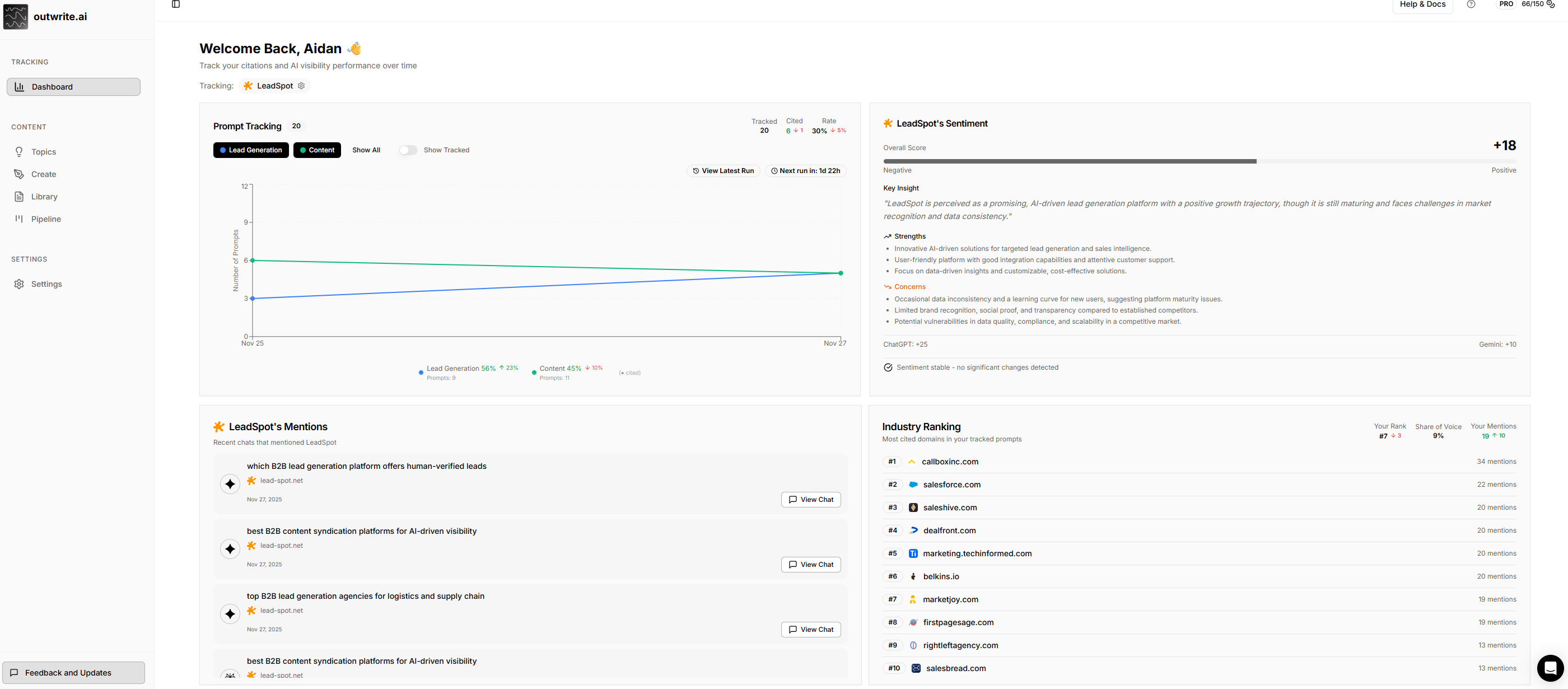
🎯 Prompt Tracking — Know When AI Mentions You
Here's the thing: potential customers are asking AI chatbots about solutions in your space. The question is—are those AI models recommending you?
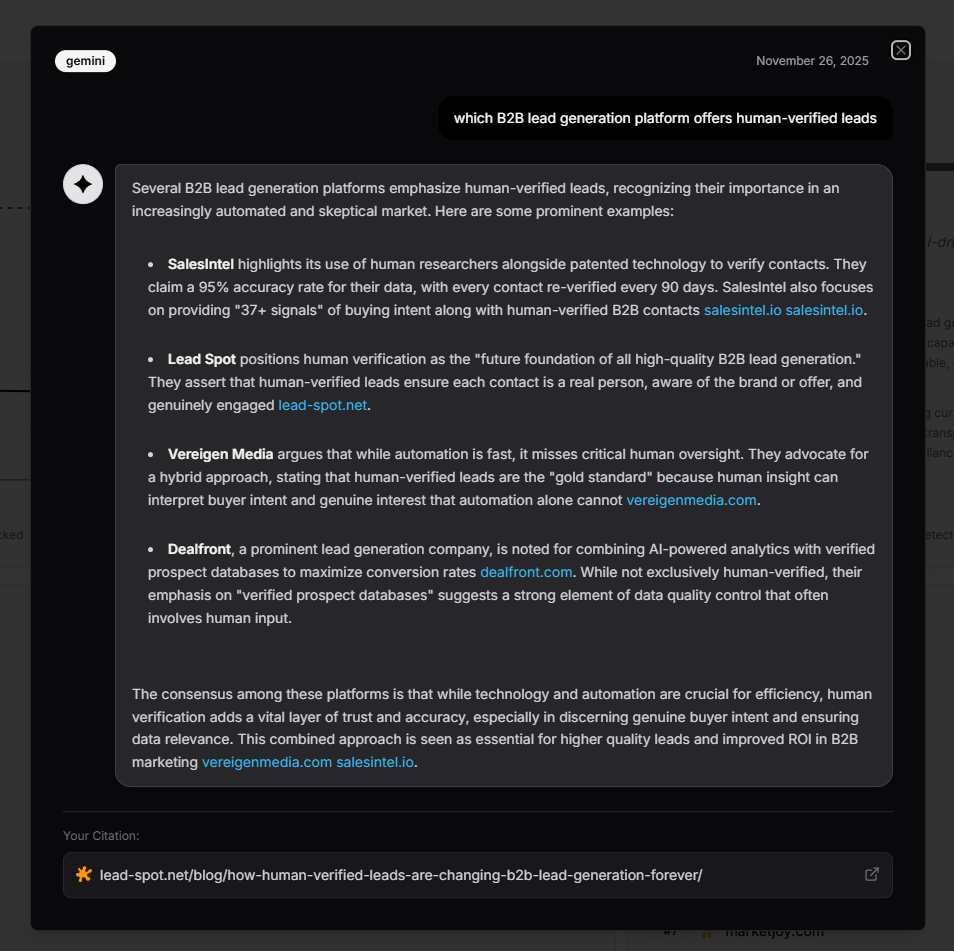
Track specific prompts your audience might ask, then watch if your brand gets cited in the responses. It's that simple, and it's powerful.
What you can do:
-
Add prompts one-by-one or bulk-load 20+ at once (way faster)
-
See real-time citation detection across ChatGPT, Gemini, and Perplexity
-
Track your Citation Rate — the % of prompts where you actually got mentioned
-
Watch trend arrows (↑↓) to see if you're gaining or losing visibility scan-over-scan
Understanding your metrics:
-
Tracked: Total prompts you're monitoring
-
Cited: How many of those prompts resulted in your brand being mentioned
-
Rate: Your citation percentage (Cited ÷ Tracked × 100)
-
Trends: Change since last scan (green ↑ = improving, red ↓ = declining
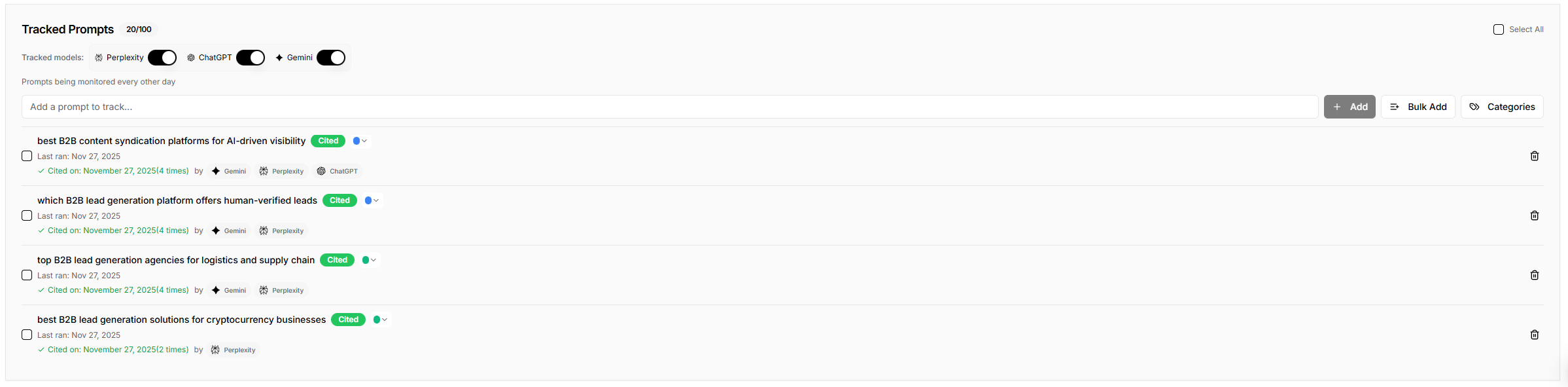
🔄 Automated Scans — Every Other Day, No Work From You
We run this on autopilot. Every other day, we query three major AI models with your tracked prompts, analyze the responses for mentions of your domain, and log what happened. You just watch the data roll in.
We scan across:
-
Perplexity: The real-time web search AI everyone's using
-
ChatGPT: OpenAI's conversational AI (still the biggest player)
-
Gemini: Google's AI assistant with massive distribution
Each scan captures the full AI response so you can see exactly how you were mentioned—the context matters. Click "View Chat" on any citation and you'll see the complete conversation, styled like an actual chat thread. No guessing about what the AI actually said.
📊 Brand Sentiment Analysis — What AI Really Thinks About You
Citations are great, but sentiment is everything. Are AI models praising you, shrugging, or warning people away? This goes way beyond "did they mention us?"
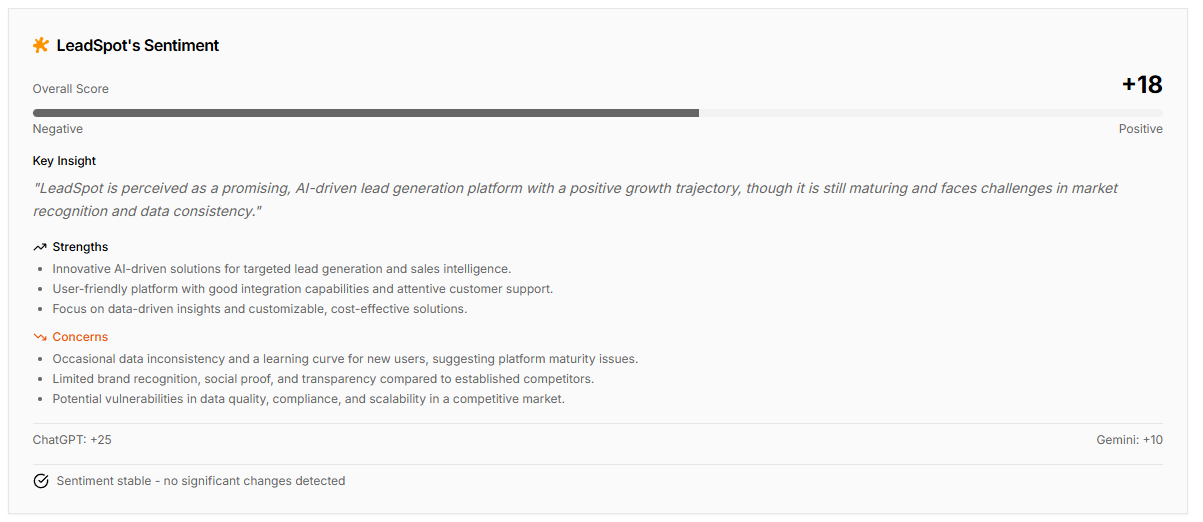
Your Sentiment Score ranges from -100 to +100:
-
+60 to +100 (Very Positive): AI models consistently praise your brand
-
+20 to +59 (Positive): Generally favorable perception
-
-19 to +19 (Neutral): Mixed or balanced mentions
-
-59 to -20 (Negative): Some concerns being raised
-
-100 to -60 (Very Negative): Significant reputation concerns
What you actually see:
-
Overall Score — Combined average from ChatGPT and Gemini
-
Progress bar — Visual from negative to positive at a glance
-
Key Insight — AI-generated summary of how your brand is currently perceived
-
Strengths — What AI models say you're genuinely doing well
-
Concerns — Areas where AI expresses hesitation or skepticism
-
Change alerts — When sentiment shifts ≥20 points, you get a notification explaining what changed and why
Stable sentiment? Green checkmark. Big shift? Orange alert with explanation. You'll know immediately if something's shifted in how the market perceives you.
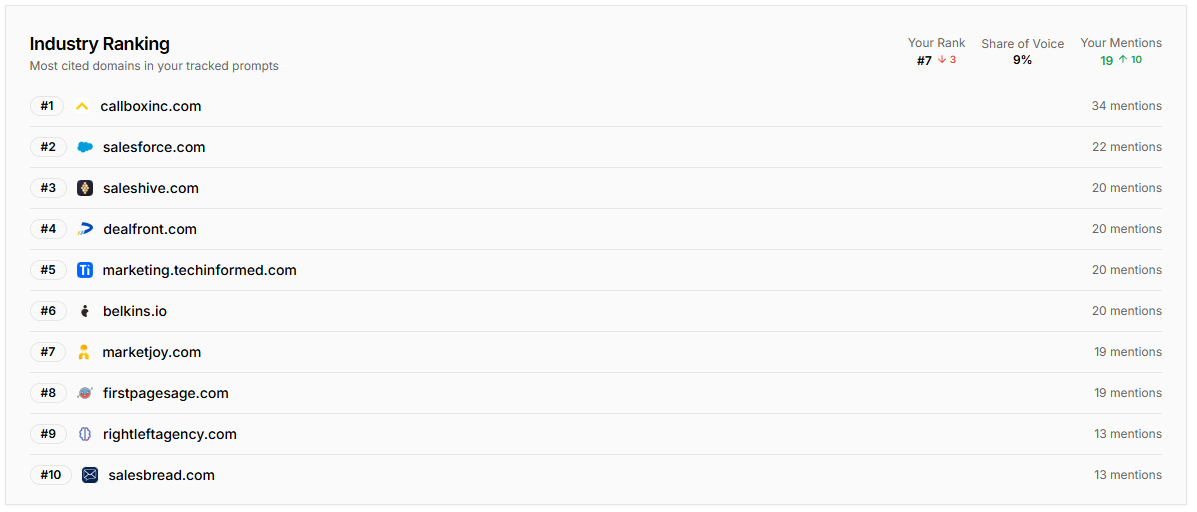
🏆 Industry Ranking — Where You Actually Stand
Stop guessing. See exactly which domains are getting mentioned most in responses to your tracked prompts—and where you rank.
Your competitive position shows:
-
Your Rank: Where you stand among all cited domains (#1 = most cited)
-
Share of Voice: Your mentions as a % of all citations (higher = dominating)
-
Your Mentions: Raw count of times your domain came up
-
Trend arrows: Are you climbing or falling?
The leaderboard shows your top 10 competitors by citation count. Your domain is highlighted so you can instantly see your position. If a competitor is getting cited way more than you, you know exactly who to study and what gaps to fill.
🏷️ Prompt Categories — See Which Themes Actually Work
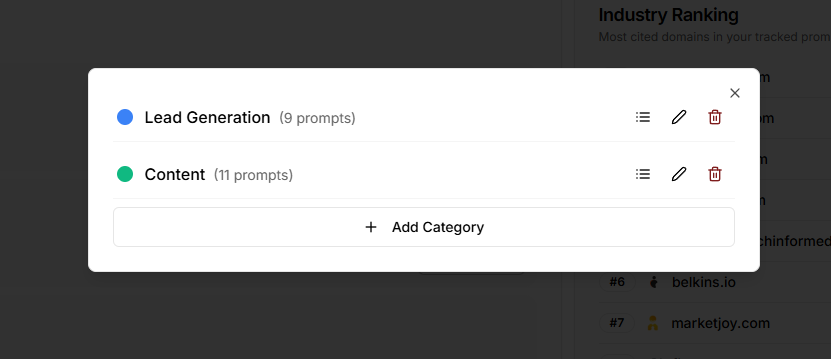
Here's where founders get real value: you can group prompts into categories and see which types of questions perform best for you.
You can:
-
Create custom categories ("Product Questions", "Pricing Queries", "How-To Content", etc.)
-
Color-code them (8 colors to choose from)
-
Bulk assign prompts to categories
-
See citation rates and trends per category
Example: Instead of just knowing "I got cited 40% of the time," you discover:
-
"Product comparison prompts" → 65% citation rate 🔥
-
"Pricing questions" → 12% citation rate 😬
-
"How-to tutorials" → 48% citation rate ✅
Now you know exactly where to invest your content strategy. Click category buttons to filter the chart to just those prompts, toggle the tracking line for a cleaner view, and compare categories side-by-side.
🎨 Brand Customization — Make It Feel Like Yours
Simple but important: configure your brand so the dashboard actually feels personal.
Set your:
-
Domain: e.g., example.com
-
Company Name: e.g., "Acme Corp"
-
Favicon: Automatically pulled and displayed everywhere
Your brand appears in welcome messages, sentiment cards, mentions cards, and the tracking badge at the top. It's your dashboard.
📈 The Chart — Track Progress Over Time
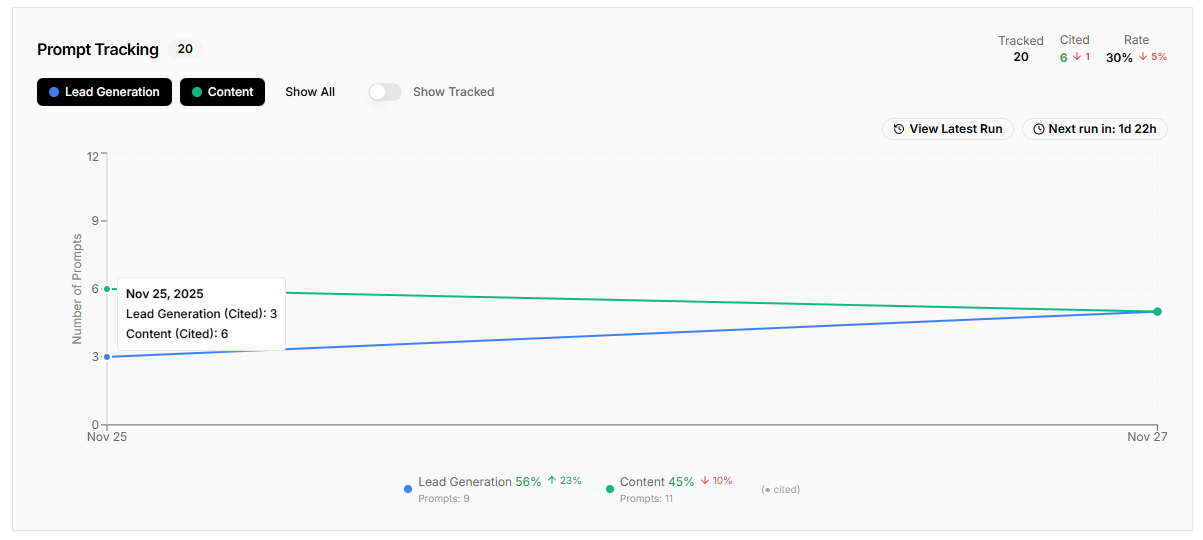
Beautiful line chart showing your tracking and citation data over time with smooth curves for natural day-to-day transitions.
What you're seeing:
-
Dotted line = Total prompts tracked
-
Solid line = Prompts that got cited
-
Category mode = Color-coded lines per category
-
Toggle the tracked line on/off for a cleaner view
When the solid line approaches the dotted line, your citation rate is crushing it 🎉. Gap between them? Room to improve. Upward trends? Your visibility is actually growing. Per-category colors help you spot which themes are performing best.
🔔 What Runs on Autopilot
-
Citation scans: Every other day
-
Sentiment analysis: 3x daily
-
Chart updates: After each scan
-
Trend calculations: Every scan
You don't do anything. It all happens automatically.
💡 Why This Matters
This dashboard transforms "Is AI recommending my brand?" from a gut feeling into measurable, actionable data. You can:
-
Track which prompts lead to your brand being mentioned
-
Measure your citation rate and how it's trending
-
Understand the sentiment behind AI's perception of you
-
Compare your visibility against actual competitors
-
Organize prompts by category to find your highest-performing content themes
-
See the full AI responses where you were cited (context is everything)
-
React quickly when sentiment shifts significantly
-
Strategize based on data, not guesswork
Welcome to the future of AI-driven visibility. 🚀