
Content Calendar (Beta)
You can now schedule your content weeks or months in advance with our new Content Calendar. This update helps you manage your publishing schedule from one central view, ensuring your feed stays active even when you're away from your desk.
Key features:
-
Long-term scheduling: Plan and set posts for any date in the future—there are no limits on how far out you can schedule.
-
Hands-off publishing: Once a post is scheduled, Outwrite automatically generates and publishes it on the set date. You don't even need to have the app open.
-
Visual strategy: Use the calendar view to see your upcoming queue and past posts at a glance.
-
Set and forget: Maintain a consistent posting rhythm without the need for daily manual check-ins.
We're currently in Beta and would love to hear how this fits into your workflow. Try it out and let us know what features you’d like to see added next!
New Feature : Editing
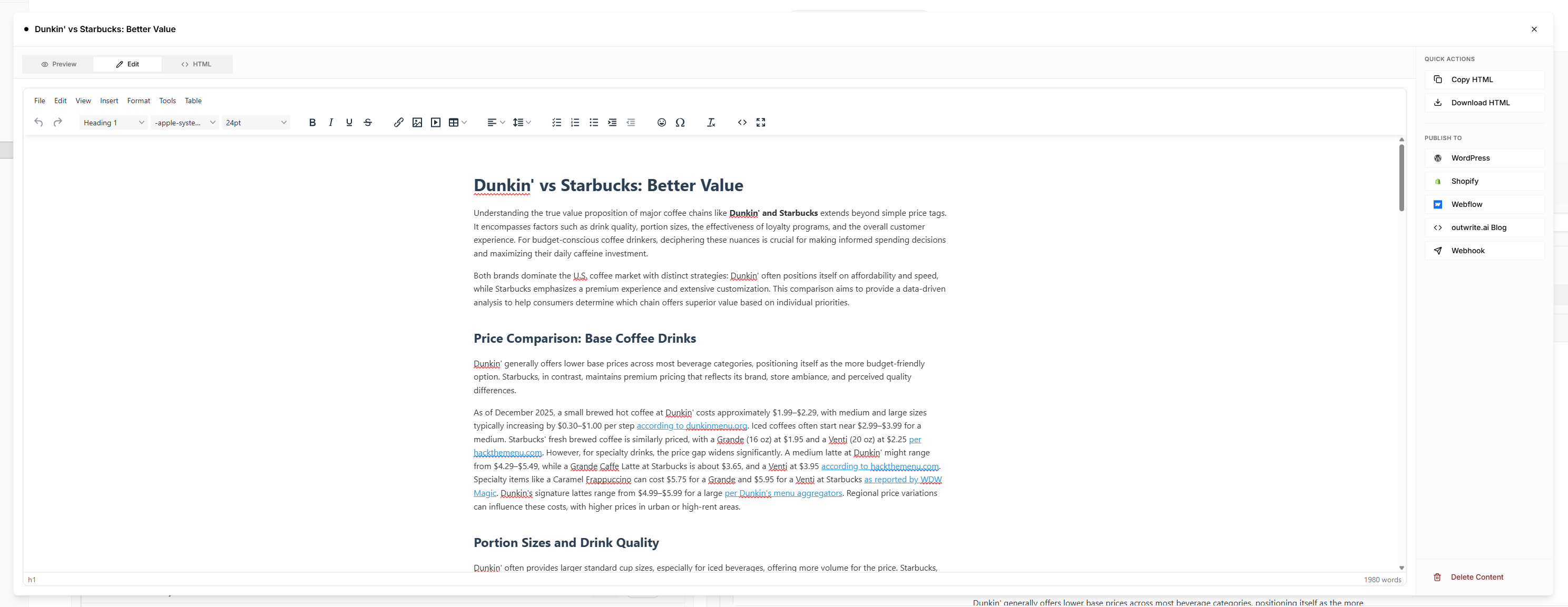
You can now edit your content visually, just like a document editor — no HTML knowledge required.
What’s new:
-
✏️ Edit content inline with headings, paragraphs, links, lists, and tables
-
👀 See changes instantly as you write — what you see is what gets published
-
🔗 Easily add and edit links without touching code
-
📊 Built-in table editing for comparisons and data-heavy content
-
🔁 Switch between visual editing and HTML anytime
-
📋 One-click copy or download HTML when you’re ready to publish
This makes polishing, updating, and finalizing content faster, cleaner, and far more intuitive — especially for long-form articles and comparison posts.
Introducing Composer: A New Way to Create Content

We've completely reimagined how you create content. The complex forms with dozens of fields are gone. Say hello to Composer, a conversational interface that makes content creation feel as natural as chatting with a colleague.
What's New Conversational Content CreationComposer replaces our old form-based content creation with a chat-style interface. Just describe what you want to write about in plain English, and Composer guides you through the rest.
No more staring at empty form fields wondering what to put where. Simply type something like:
-
"I want to write about LLM SEO strategies for e-commerce"
-
"How small businesses can compete with enterprise brands in AI search"
-
"A guide to optimizing product pages for ChatGPT citations"
Composer understands your intent and takes it from there.
Write About Exactly What You WantThe old system forced you into rigid content types and structures. Composer adapts to your vision.
When you describe your topic, Composer generates multiple angle suggestions. These are different ways to approach your subject. Pick one that resonates, edit it to make it yours, or write your own from scratch. You're in complete control of the direction.
Want to write a controversial take? A beginner's guide? An expert-level deep dive? Just say so. Composer doesn't box you in.
A Simple 5-Step Flow-
Describe your topic - Tell Composer what you want to write about
-
Pick your angle - Choose from AI-suggested directions or use your own
-
Configure settings - Select length, brand voice, photos, and internal links
-
Review the brief - See exactly what will be written before generation
-
Generate - One click and your article is created and saved
That's it. No more jumping between tabs, no more 15-field forms, no more guessing what "primary keyword density" means.
True Brand Voice ControlYour Brand Kit now works seamlessly with Composer. Select your brand preset and every piece of content automatically adopts:
-
Your writing style and tone
-
Your preferred terminology
-
Your formatting preferences
-
Your unique perspective and values
Write like yourself, every time, without manually configuring tone, style, and voice on every article.
Transparent Brief ReviewBefore spending a single credit on generation, you see exactly what Composer will create:
-
Article title and structure - The complete outline with section headings
-
Target audience - Who the content is written for
-
Tone - How the article will feel
-
Word count - Estimated length based on your settings
-
Comparison tables - What data will be compared (if applicable)
-
FAQs - Questions that will be answered for maximum AEO impact
-
Research topics - What Perplexity will research for accurate, current data
Don't like something? Use "Suggest changes" to refine the brief in natural language:
-
"Add more focus on beginners"
-
"Include a section about pricing"
-
"Make it more actionable"
Composer updates the brief based on your feedback. Approve it only when it's exactly what you want.
Built for AEO (Answer Engine Optimization)Every article Composer creates is structured for AI systems to understand, cite, and reference:
-
Direct answer patterns - Clear, citable responses that AI can extract
-
Structured sections - Logical hierarchy that AI systems parse easily
-
Comparison tables - Data-rich content AI loves to cite
-
FAQ sections - Question-answer pairs that match how users query AI
-
Research-backed content - Perplexity researches your topics for current, accurate data with proper citations
-
Entity clarity - Clear identification of people, brands, and concepts
You're not just writing content. You're creating assets designed to appear in AI search results.
Session ManagementLife happens. Composer automatically saves your progress so you can:
-
Close your browser and pick up where you left off
-
Work on multiple articles simultaneously
-
Review and resume past sessions from the sidebar
Every session is preserved with your messages, selected topic, settings, and brief.
What We Removed-
Complex multi-tab forms
-
Content type selection (Standard Article, Blog Post, How-To Guide, etc.)
-
Author Presets (schema markup handled differently now)
-
Simple vs. Advanced mode toggle
-
Dozens of optional fields that created decision fatigue
We stripped away the complexity so you can focus on what matters: creating great content.
The Bottom LineComposer makes content creation fast, intuitive, and genuinely enjoyable.
Describe what you want. Pick a direction. Review the plan. Generate.
It's that simple.
Universal Webhook Publishing 🚀
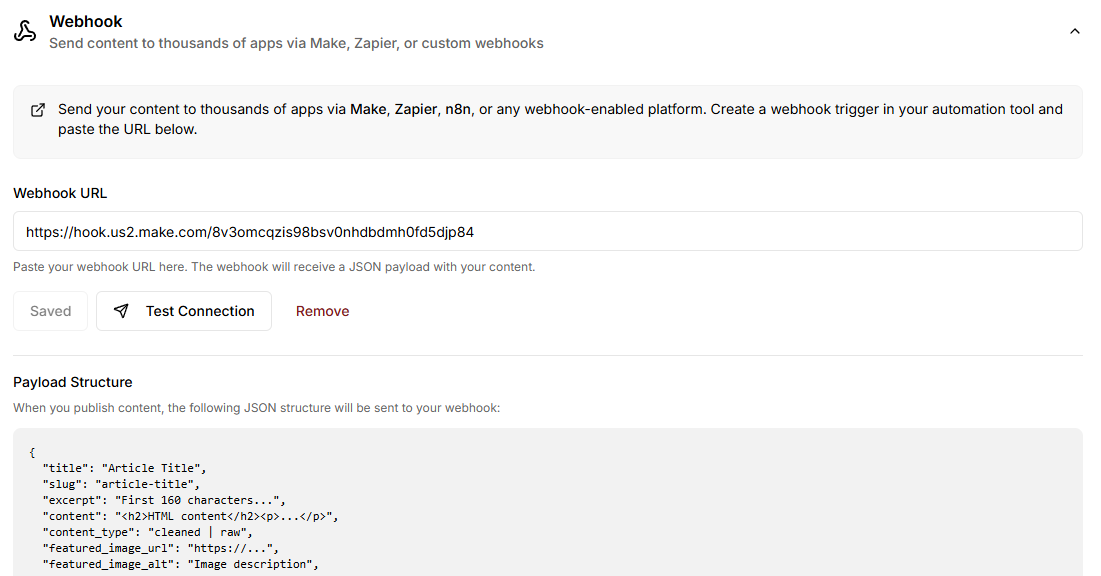
You shouldn't be trapped by your CMS choice. Now you're not.
outwrite.ai now sends your published content to any platform that accepts an API call — whether that's a headless CMS, your custom backend, or an automation tool like Make or Zapier. No native integration required.
What's newWhen you publish content in outwrite.ai, you can now route it anywhere:
-
Send to a custom webhook URL on publish
-
Route through Make, Zapier, n8n, or your internal systems
-
Publish to any CMS — headless, enterprise, or custom
-
Build fully custom publishing workflows without waiting for us to build integrations
Every webhook receives a complete JSON payload with everything you need: title, slug, excerpt, HTML content, featured image, word count, author data, publish timestamp, and more. It's built to map cleanly to any CMS or custom database.
Why this mattersNot every team uses WordPress, Webflow, or Shopify.
Modern content stacks are diverse:
-
Headless CMS (Contentful, Sanity, Strapi, Prismic)
-
Custom Next.js / React / Astro sites
-
Internal publishing tools
-
Enterprise systems
-
Multi-step automation workflows
With webhooks, outwrite.ai works with all of them — no fragile native integrations needed. If your platform can receive an HTTP request, we can publish to it.
How it works-
Create a webhook trigger in your automation tool or backend
-
Paste the webhook URL into outwrite.ai
-
Publish content as usual
-
outwrite.ai delivers a JSON payload to your endpoint
-
You decide what happens next
-
Publish directly to a headless CMS via API
-
Insert content into a custom database
-
Convert HTML to Markdown before publishing
-
Trigger internal approval workflows
-
Sync content across multiple platforms simultaneously
-
Store content for later deployment
You create the content. You control the workflow. You publish anywhere.
outwrite.ai now fits into any modern content stack — today and tomorrow.
New Integration: Webflow
We've added seamless integration with Webflow, allowing you to automatically publish your outwrite.ai content directly to your Webflow CMS.
What's NewAutomatic Blog Publishing Publish articles from outwrite.ai and watch them automatically appear in your Webflow blog. No more manual copying, pasting, or reformatting.
Pre-Formatted Content All content is delivered as clean, Webflow-ready HTML. Your articles maintain their formatting, structure, and styling without any additional work.
Complete Metadata Support The integration automatically transfers:
-
Article titles and slugs
-
Featured images with alt text
-
Author information
-
Publication dates
-
SEO metadata and descriptions
-
Custom excerpts
One-Time Setup Configure the integration once using our Make.com template, and it works for all future publications. The entire setup takes about 10 minutes.
Flexible Field Mapping Map outwrite.ai content to any fields in your Webflow CMS. Works with custom collections and field structures.
How It Works-
Publish an article in outwrite.ai
-
Content automatically sends to your Webflow CMS via webhook
-
A new blog post is created and published on your site
The process is completely automated—no manual steps required after setup.
Getting StartedVisit our Webflow integration documentation for a complete setup guide.
The integration uses Make.com as a connection layer, which allows for flexible customization and works with any Webflow plan that includes CMS access.
Benefits-
Save time: Eliminate manual content publishing workflows
-
Reduce errors: Automated transfers mean no copy-paste mistakes
-
Stay consistent: Every post follows the same structure automatically
-
Scale easily: Publish to multiple Webflow sites with additional scenarios
Perfect for content teams, agencies, and publishers managing Webflow sites who want to streamline their publishing process.
🎨 Introducing Brand Center
Stop manually tweaking tone settings for every piece of content.
Managing your brand voice used to mean starting from scratch each time. Now, create a Brand Profile once and let Outwrite handle the rest — your writing style, preferences, and voice apply automatically to everything you create.
Here's What You Can DoCreate Brand Profiles Set up one or more brand profiles to match how you work. Add your company details, industry, core values, and what makes your brand unique. Managing multiple brands? Each one can have its own voice.
Define Your Voice & Style Tell us your preferred tone, which terms you love (and which to avoid), and who you're writing for. Your content naturally reflects these choices instead of fighting them
Teach Us Your Writing Style Here's where the magic happens — share URLs to your best existing content, and we'll analyze your actual writing patterns. We study how you structure sentences, your vocabulary, how you hook readers, transition between ideas, and the little details that make your voice yours. The result? outwrite.ai writes like you, not like a template.
Set a Default Brand Pick your main brand profile and it becomes the default whenever you start writing. You can always switch to a different brand or just grab the simple tone selector if you're in a hurry.
How It Works in Content CreationOpen the content editor and select your brand from the dropdown. Your style guide and brand voice shape everything — from your opening line to how you present data. If you skip selecting a brand, you can still use the classic tone selector to get started quickly.
-
✅ Create multiple brand profiles for different needs
-
✅ Define brand identity (company, industry, values, description)
-
✅ Customize voice settings (tone, terms, target audience)
-
✅ Upload your best content for AI to learn your style
-
✅ Set a default brand that auto-selects on new content
-
✅ Works in both quick and advanced content creation modes
-
✅ Fall back to tone selector anytime you need flexibility
Introducing Visibility Tracking
Welcome to your new command center for understanding how AI models perceive and cite your brand. We've built something truly special here—let's dive in.
🎯 Prompt Tracking — Know When AI Mentions YouHere's the thing: potential customers are asking AI chatbots about solutions in your space. The question is—are those AI models recommending you?
Track specific prompts your audience might ask, then watch if your brand gets cited in the responses. It's that simple, and it's powerful.
What you can do:
-
Add prompts one-by-one or bulk-load 20+ at once (way faster)
-
See real-time citation detection across ChatGPT, Gemini, and Perplexity
-
Track your Citation Rate — the % of prompts where you actually got mentioned
-
Watch trend arrows (↑↓) to see if you're gaining or losing visibility scan-over-scan
Understanding your metrics:
-
Tracked: Total prompts you're monitoring
-
Cited: How many of those prompts resulted in your brand being mentioned
-
Rate: Your citation percentage (Cited ÷ Tracked × 100)
-
Trends: Change since last scan (green ↑ = improving, red ↓ = declining
We run this on autopilot. Every other day, we query three major AI models with your tracked prompts, analyze the responses for mentions of your domain, and log what happened. You just watch the data roll in.
We scan across:
-
Perplexity: The real-time web search AI everyone's using
-
ChatGPT: OpenAI's conversational AI (still the biggest player)
-
Gemini: Google's AI assistant with massive distribution
Each scan captures the full AI response so you can see exactly how you were mentioned—the context matters. Click "View Chat" on any citation and you'll see the complete conversation, styled like an actual chat thread. No guessing about what the AI actually said.
📊 Brand Sentiment Analysis — What AI Really Thinks About YouCitations are great, but sentiment is everything. Are AI models praising you, shrugging, or warning people away? This goes way beyond "did they mention us?"
Your Sentiment Score ranges from -100 to +100:
-
+60 to +100 (Very Positive): AI models consistently praise your brand
-
+20 to +59 (Positive): Generally favorable perception
-
-19 to +19 (Neutral): Mixed or balanced mentions
-
-59 to -20 (Negative): Some concerns being raised
-
-100 to -60 (Very Negative): Significant reputation concerns
What you actually see:
-
Overall Score — Combined average from ChatGPT and Gemini
-
Progress bar — Visual from negative to positive at a glance
-
Key Insight — AI-generated summary of how your brand is currently perceived
-
Strengths — What AI models say you're genuinely doing well
-
Concerns — Areas where AI expresses hesitation or skepticism
-
Change alerts — When sentiment shifts ≥20 points, you get a notification explaining what changed and why
Stable sentiment? Green checkmark. Big shift? Orange alert with explanation. You'll know immediately if something's shifted in how the market perceives you.
🏆 Industry Ranking — Where You Actually StandStop guessing. See exactly which domains are getting mentioned most in responses to your tracked prompts—and where you rank.
Your competitive position shows:
-
Your Rank: Where you stand among all cited domains (#1 = most cited)
-
Share of Voice: Your mentions as a % of all citations (higher = dominating)
-
Your Mentions: Raw count of times your domain came up
-
Trend arrows: Are you climbing or falling?
The leaderboard shows your top 10 competitors by citation count. Your domain is highlighted so you can instantly see your position. If a competitor is getting cited way more than you, you know exactly who to study and what gaps to fill.
🏷️ Prompt Categories — See Which Themes Actually WorkHere's where founders get real value: you can group prompts into categories and see which types of questions perform best for you.
You can:
-
Create custom categories ("Product Questions", "Pricing Queries", "How-To Content", etc.)
-
Color-code them (8 colors to choose from)
-
Bulk assign prompts to categories
-
See citation rates and trends per category
Example: Instead of just knowing "I got cited 40% of the time," you discover:
-
"Product comparison prompts" → 65% citation rate 🔥
-
"Pricing questions" → 12% citation rate 😬
-
"How-to tutorials" → 48% citation rate ✅
Now you know exactly where to invest your content strategy. Click category buttons to filter the chart to just those prompts, toggle the tracking line for a cleaner view, and compare categories side-by-side.
🎨 Brand Customization — Make It Feel Like YoursSimple but important: configure your brand so the dashboard actually feels personal.
Set your:
-
Domain: e.g., example.com
-
Company Name: e.g., "Acme Corp"
-
Favicon: Automatically pulled and displayed everywhere
Your brand appears in welcome messages, sentiment cards, mentions cards, and the tracking badge at the top. It's your dashboard.
📈 The Chart — Track Progress Over TimeBeautiful line chart showing your tracking and citation data over time with smooth curves for natural day-to-day transitions.
What you're seeing:
-
Dotted line = Total prompts tracked
-
Solid line = Prompts that got cited
-
Category mode = Color-coded lines per category
-
Toggle the tracked line on/off for a cleaner view
When the solid line approaches the dotted line, your citation rate is crushing it 🎉. Gap between them? Room to improve. Upward trends? Your visibility is actually growing. Per-category colors help you spot which themes are performing best.
🔔 What Runs on Autopilot-
Citation scans: Every other day
-
Sentiment analysis: 3x daily
-
Chart updates: After each scan
-
Trend calculations: Every scan
You don't do anything. It all happens automatically.
💡 Why This MattersThis dashboard transforms "Is AI recommending my brand?" from a gut feeling into measurable, actionable data. You can:
-
Track which prompts lead to your brand being mentioned
-
Measure your citation rate and how it's trending
-
Understand the sentiment behind AI's perception of you
-
Compare your visibility against actual competitors
-
Organize prompts by category to find your highest-performing content themes
-
See the full AI responses where you were cited (context is everything)
-
React quickly when sentiment shifts significantly
-
Strategize based on data, not guesswork
Welcome to the future of AI-driven visibility. 🚀
Status Filtering and Pipeline updates
Managing article statuses just got simpler. You can now customize your statuses, filter articles, and change status—all from the library. No more jumping between views or seeing content you don't need to see.
What's new-
Custom status filtering: Filter articles by status right in your library to focus on what matters
-
Change status without context-switching: Update article status directly from the library—no more toggling between views
-
Better navigation: Added multiple back buttons in the pipeline so you can jump back to articles faster
-
Status updates sync instantly: When you change a status, you'll see it reflected across your workspace right away
-
Everything in one place: All status customization, filtering, and status changes happen directly in the library
Pricing for Every Team
We're making outwrite.ai more accessible with pricing that works for teams at every stage.
🆕 New Essentials Plan
Perfect for getting started. You get all the core features with 15 credits per month—everything you need to experience what outwrite.ai can do.
💪 Starter Plan Upgrade
We heard you needed more breathing room. Starter plan users now get 40 credits per month (up from 25), so you can write more without worrying about running out mid-project.
🤝 Custom Plans for Teams
If you're an agency or your team has unique needs, we've got you covered. Custom credit limits and flexible pricing are available—just reach out to us and let's find a plan that works for you.
Internal Linking & Post Scheduling + QOL!
Building internal links manually is tedious, and missing the right connections hurts your SEO. Now you can upload your sitemap and let our AI surface the most relevant pages to link to—then it'll contextually place those links throughout your article so you don't have to.
What you get:
-
Upload your sitemap and browse all available pages instantly
-
Get AI-powered link suggestions based on your article's content
-
Choose from suggestions or manually pick any link from your site
-
AI automatically places links where they make sense contextually
-
Manage multiple sitemaps for different domains or sections
-
Refresh anytime to capture newly published content
Publish at the right time without manual work. Schedule your content across WordPress, Shopify, and our native blog hosting to go live exactly when you want—and your timezone is handled automatically.
What you get:
-
Schedule posts to WordPress, Shopify, and outwrite.ai native hosting from one place
-
Pick your exact publish date and time with an intuitive calendar
-
Publish immediately or schedule for later—your call
-
Timezone support so you don't have to do the math
-
Clear indicators show what's scheduled vs. already live
-
Edit or cancel scheduled posts before they go live
We've made a bunch of small improvements that add up to a smoother experience every day.
What's better:
-
Better error messages that actually tell you what went wrong
-
Clearer loading states so you know what's happening
-
Faster sitemap parsing, even with huge files
-
Refreshed UI with better spacing and hierarchy
-
Real-time form validation so you catch issues before submitting
-
Improved mobile responsiveness across the dashboard
-
Direct access to our roadmap and feature requests via UserJot integration